
CSI Lawyer 12.0 update package 21.2.24
21. February, 2024 | Version UpdatesWe’ll release today a new update package for CSI Lawyer 12.0. The update package will fix the following software defects:
Matters
- The sub-matter numbering according to the main matter did not work if a new sub-matter was created with the Use as Template function.
Pricing
- If a new transaction was created using an existing transaction as a template, the customer-specific role price was ignored and the transaction got the wrong hour price.
Entries
- There were errors in the transaction posting periods, e.g. the posting period did not always open, there could be a locked period between the openable periods or duplicate rows in the posting period views.
- If a user opened the posting period window popup window and navigated more than four weeks backwards using the left arrow, the user was no longer able to navigate back to the current period as the right arrow became disabled.
Preliminary invoices
- The change made to the entry date of the main preliminary invoice did not update the entry date of its sub preliminary invoice. However, the problem was only cosmetic, as the invoice entry date is always determined according to the main preliminary invoice’s entry date.
- When an expense was added to the preliminary invoice the software gave an unnecessary error message “The data in the database had changed before you executed this action. The data will be reloaded after which you can try again.”
- When the last or the only transaction was removed from the preliminary invoice, the software gave a strange error message as it unnecessarily tried and find an invoicing period for the preliminary invoice.
- In a specific situation, an invoiced preliminary invoice remained in status Open, in which case it could still be modified. After the correction, the software gives an error message if this happens.
- When selecting the “Adjust Price” function on a rejected preliminary invoice, the software gave an unclear error message. After the correction, the “Preliminary invoice has been rejected” message is displayed.
Invoices
- The following terms have been corrected in the footer of the invoice template that comes with the country package for Sweden: Org-nummer>Org.nummer, Hemort>Säte and FO nummer>VAT-nummer.
- In the Estonian invoice material, the advance invoice had the wrong tax rate (22 %) when the tax rate of the actual invoice (VAT 22% in 2024) differed from the tax rate of the advance invoice and payment which were recorded in 2023 (when the VAT was 20%).
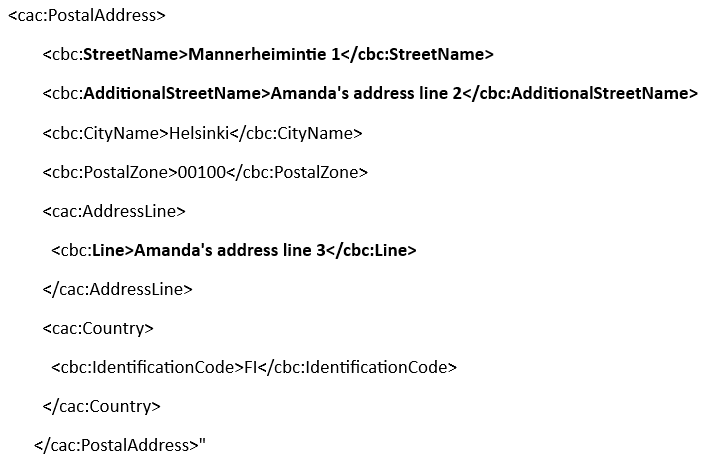
- In the Peppol 3.0 invoice material, the address lines 1 and/or 2 were placed in the wrong element (AddressLine->Line) in the business unit and payer addresses, so the receiving system did not always read them. After the correction, the address lines 1, 2 and 3 are placed in the xml file as follows:
Bookkeeping integrations
- Fennoa, Netvisor, and Procountor integrations gave an unclear error message if the console and version-specific dlls were incompatible. After the correction, the error message is “Current Console does not support version: [version number]. Please update the console.”
- In the Fennoa, Fortnox, Hogia, Netvisor and Procountor integrations, the cost forward invoicing by purchase information taxability was not enabled when the expense was imported from a balance sheet account that did not have VAT handling. After correction, the 100€ expense transferred from the non-VAT balance sheet account contains the following information: net purchase 100€, purchase VAT “tax-free”, gross purchase 100€, cost forward invoicing “by purchase information taxability” and sales tax-free “no”.
- The Fortnox integration required re-authentication even though it had been active during the past 31 days.
- If the authentication of the Fortnox integration failed, there was no detailed description of the error in the integration log.
- The Hogia integration incorrectly transferred expenses which were related to closed matters although they should have been transferred only for the active ones.
Document management integrations
- When the SharePoint365 document management was in use enabled and a customer responsible who did not have Azure AD configured tried and open documents through the customer window, the software did not give any error message. After the correction, a notification is displayed about the Azure AD which is required by the SharePoint integration and missing from the user.
Reports and views
- The default filters of the system views (such as the date limit) could be modified in the settings, even if the change was not saved. After the correction, the filters remain locked in the preview of the system views. It is only possible to modify the filters of the views having “My” and “Custom” as a source.
- By customizing, it was possible to add to matter views a “Last Entry Date” field which, however, was intended for mass deletion of matters and displayed the value 1.1.1753 if the matter had no entries. The date of the last entry can be customized to the matter views by using the “Last date of transaction or expense” field.
- Adding to the Dashboard charts and reports which were imported and published was not successful, and charts removed from the Dashboard could not be added there again.
Other
- If the Microsoft Edge WebView2 Runtime component was not installed on the user’s machine, the CSI software crashed without giving a clear error message. After the correction, the user is displayed an error message and prompted to install the component in question.